In India? This page describes Operlio in Canada and the US. In India there are no automatic text messages, card payments on invoices, autopay or QuickBooks: messages to your customers go out on WhatsApp from your own phone, and automatic reminders reach customers by email when they have one. Invoices carry your UPI details instead. See Operlio for India, with prices in INR
¿Estás en México? Esta página describe Operlio en Canadá y Estados Unidos. En México no hay mensajes de texto automáticos ni QuickBooks: los mensajes a tus clientes se envían por WhatsApp desde tu propio teléfono, y los recordatorios automáticos llegan por correo a los clientes que tienen correo. Ver Operlio en México, con precios en MXN
¿Estás en Colombia? Esta página describe Operlio en Canadá y Estados Unidos. En Colombia no hay mensajes de texto automáticos, pagos con tarjeta en las facturas, cobro automático ni QuickBooks: los mensajes a tus clientes se envían por WhatsApp desde tu propio teléfono, y los recordatorios automáticos llegan por correo a los clientes que tienen correo. Ver Operlio en Colombia, con precios en COP
¿Estás en Chile? Esta página describe Operlio en Canadá y Estados Unidos. En Chile no hay mensajes de texto automáticos, pagos con tarjeta en las facturas, cobro automático ni QuickBooks: los mensajes a tus clientes se envían por WhatsApp desde tu propio teléfono, y los recordatorios automáticos llegan por correo a los clientes que tienen correo. Ver Operlio en Chile, con precios en CLP
¿Estás en Perú? Esta página describe Operlio en Canadá y Estados Unidos. En Perú no hay mensajes de texto automáticos, pagos con tarjeta en las facturas, cobro automático ni QuickBooks: los mensajes a tus clientes se envían por WhatsApp desde tu propio teléfono, y los recordatorios automáticos llegan por correo a los clientes que tienen correo. Ver Operlio en Perú, con precios en PEN
¿Estás en Costa Rica? Esta página describe Operlio en Canadá y Estados Unidos. En Costa Rica no hay mensajes de texto automáticos, pagos con tarjeta en las facturas, cobro automático ni QuickBooks: los mensajes a tus clientes se envían por WhatsApp desde tu propio teléfono, y los recordatorios automáticos llegan por correo a los clientes que tienen correo. Ver Operlio en Costa Rica, con precios en CRC
¿Estás en República Dominicana? Esta página describe Operlio en Canadá y Estados Unidos. En República Dominicana no hay mensajes de texto automáticos, pagos con tarjeta en las facturas, cobro automático ni QuickBooks: los mensajes a tus clientes se envían por WhatsApp desde tu propio teléfono, y los recordatorios automáticos llegan por correo a los clientes que tienen correo. Ver Operlio en República Dominicana, con precios en DOP
Está no Brasil? Esta página descreve o Operlio no Canadá e nos Estados Unidos. No Brasil não há SMS automáticos nem QuickBooks: as mensagens para seus clientes vão pelo WhatsApp do seu próprio celular, os lembretes automáticos chegam por e-mail aos clientes que têm e-mail, e as faturas trazem a sua chave Pix. Ver o Operlio no Brasil, com preços em reais
In South Africa? This page describes Operlio in Canada and the US. In South Africa there are no automatic text messages, card payments on invoices, autopay or QuickBooks: messages to your customers go out on WhatsApp from your own phone, and automatic reminders reach customers by email when they have one. See Operlio for South Africa, with prices in ZAR
In the United Arab Emirates? This page describes Operlio in Canada and the US. In the United Arab Emirates there are no automatic text messages or QuickBooks: messages to your customers go out on WhatsApp from your own phone, and automatic reminders reach customers by email when they have one. See Operlio for United Arab Emirates, with prices in AED
In Saudi Arabia? This page describes Operlio in Canada and the US. In Saudi Arabia there are no automatic text messages, card payments on invoices, autopay or QuickBooks: messages to your customers go out on WhatsApp from your own phone, and automatic reminders reach customers by email when they have one. See Operlio for Saudi Arabia, with prices in SAR
In Singapore? This page describes Operlio in Canada and the US. In Singapore there are no automatic text messages or QuickBooks: messages to your customers go out on WhatsApp from your own phone, and automatic reminders reach customers by email when they have one. See Operlio for Singapore, with prices in SGD
In Malaysia? This page describes Operlio in Canada and the US. In Malaysia there are no automatic text messages or QuickBooks: messages to your customers go out on WhatsApp from your own phone, and automatic reminders reach customers by email when they have one. See Operlio for Malaysia, with prices in MYR
In Israel? This page describes Operlio in Canada and the US. In Israel there are no automatic text messages, card payments on invoices, autopay or QuickBooks: messages to your customers go out on WhatsApp from your own phone, and automatic reminders reach customers by email when they have one. See Operlio for Israel, with prices in ILS
In Pakistan? This page describes Operlio in Canada and the US. In Pakistan there are no automatic text messages, card payments on invoices, autopay or QuickBooks: messages to your customers go out on WhatsApp from your own phone, and automatic reminders reach customers by email when they have one. Invoices carry your Raast ID and bank details instead. See Operlio for Pakistan, with prices in PKR
Operlio for snow removal
Snow removal software: every driveway on your route, in order, with proof.
Put your seasonal clients on call, and when it snows, send the whole route out at once. Stops are sorted nearest-first, and crews snap an after photo at each one, so a "you never came" call ends there.
$19 CAD$13.99 USD£9.99$20.99 AUD$22.99 NZD/mo for up to 3 people. $79 CAD$55.99 USD£41.99$86.99 AUD$95.99 NZD/mo for a crew of up to 10. Every feature included.
Start free trial14 days free, no card. The clock starts the first time you start a job or add a customer. Then month to month, cancel anytime.
For lawn care, landscaping, snow removal, residential and commercial cleaning, janitorial and commercial cleaning, window cleaning, pool service, pressure washing, gutter cleaning, pest control, pet waste removal and handyman services crews in the US and Canada.



- No card to start
- Month to month, no contract
- Export your data anytime
Snow removal software that works when it snows, not on a fixed day
Snow work doesn't follow a calendar, so Operlio doesn't force it to. Put seasonal clients on call. When a storm comes, open the dispatch list, tick the driveways and lots to clear, and Operlio creates the visits and orders the stops nearest-first. Nothing sits on the schedule between storms.
Every finished stop carries the crew's photo and the time it was done, which settles most "you never came" calls in one text. Bill each push as it's done, or put a client on a seasonal contract: one season price in monthly payments, each invoice sent on its date (or charged to the client's saved card) into your own Stripe account. With two trucks, one dispatch splits the stops into an area per truck.
The app is in English and French, which matters if you plow in Quebec or Ontario with a bilingual crew, and every plan includes every feature.
A snowfall in Operlio
- 3:30 a.m.Snow is falling. You open the on-call list and tick the clients to clear.
- 4:00Crews open their route on their phone, ordered nearest-first, with notes for each lot.
- MorningEach driveway gets an after photo. You see on the map which ones are done.
- After the stormPer-push visits become invoices or charge saved cards. Seasonal clients are covered by their contract.
What Operlio takes care of
A 4 a.m. snowfall and a route on paper
Tick the clients to clear and Operlio creates the visits and orders the stops. Crews open the list on their phone and go.
"You never came"
Every finished stop carries the crew's photo and the time it was completed, ready to show a client who calls.
Billing every push by hand
Bill each push in one tap, or put a client on a seasonal contract: one price for the season, split into monthly invoices that go out on their own.
Set the frequency once. Every visit follows.
- Residential drivewayOn call, each snowfall
- Commercial lot, plow and saltOn call, each snowfall
- Walkway shovellingOn call, each snowfall
Examples. Any customer can be set to weekly, every 2 weeks, monthly, every 3 or 6 months, once a year, or on call.
Set it up once. Then it runs every week.
- 1
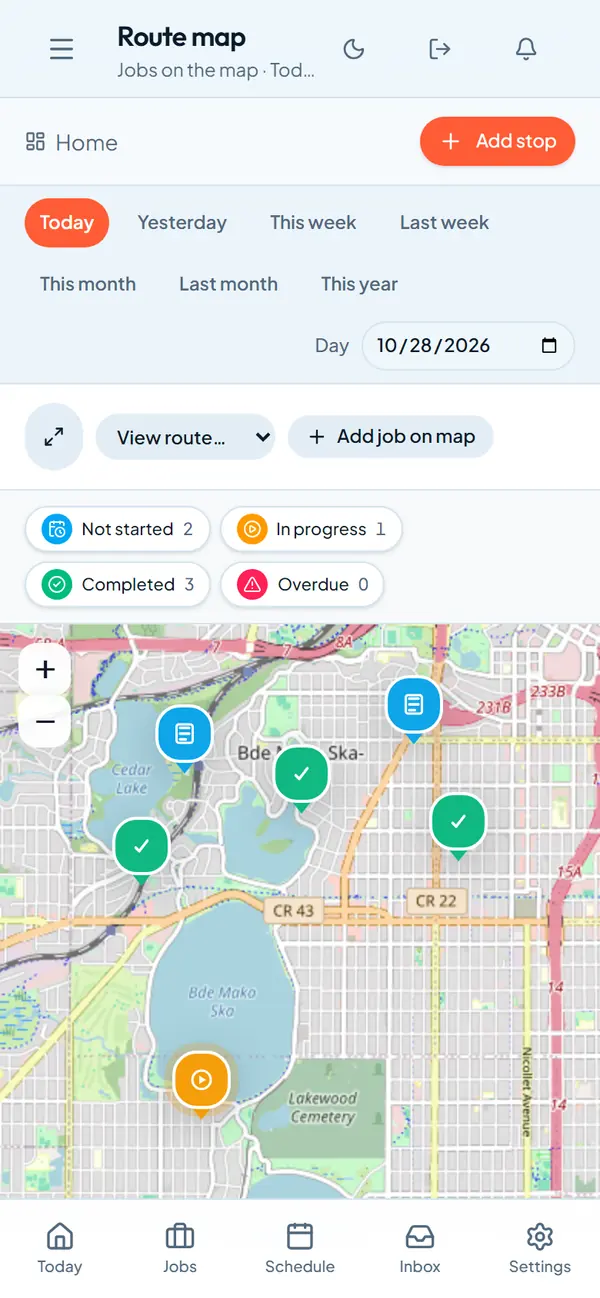
Add your customers
Type them in, or import your list from a spreadsheet (CSV). That works with exports from Jobber, Housecall Pro, QuickBooks and Square. Each address is pinned on the map for you.
- 2
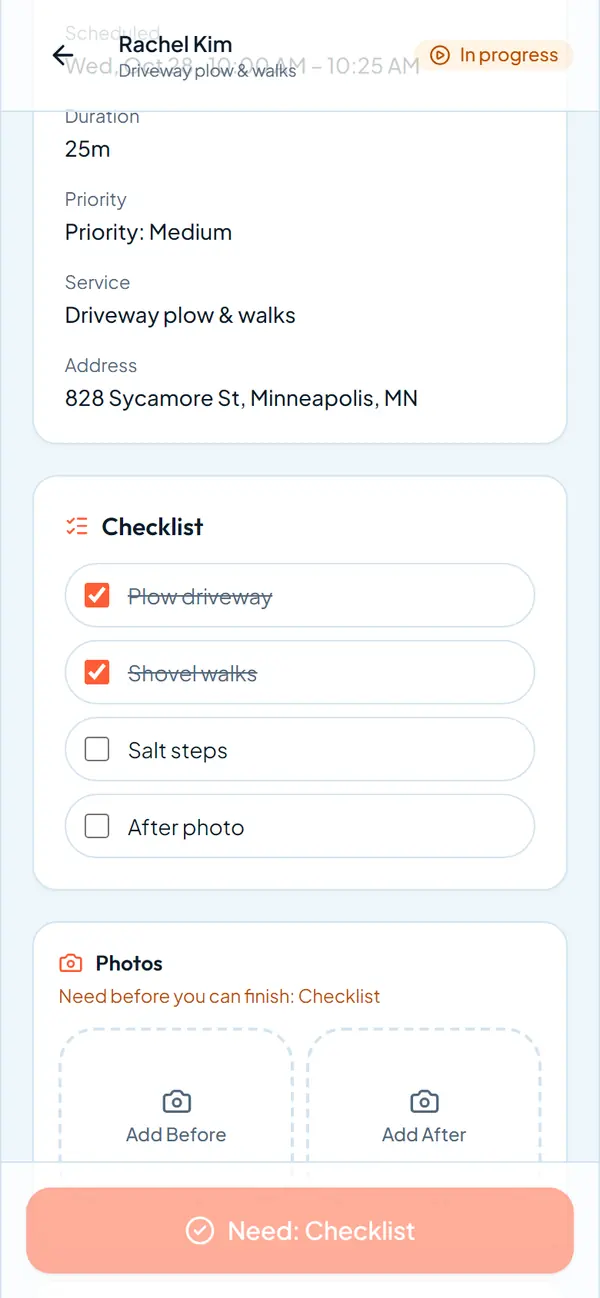
Visits schedule themselves
Set each customer to weekly, every two weeks, monthly or on call. Every visit lands on the right day. Each crew member's phone shows their stops in driving order, with the checklist and a Complete button.
- 3
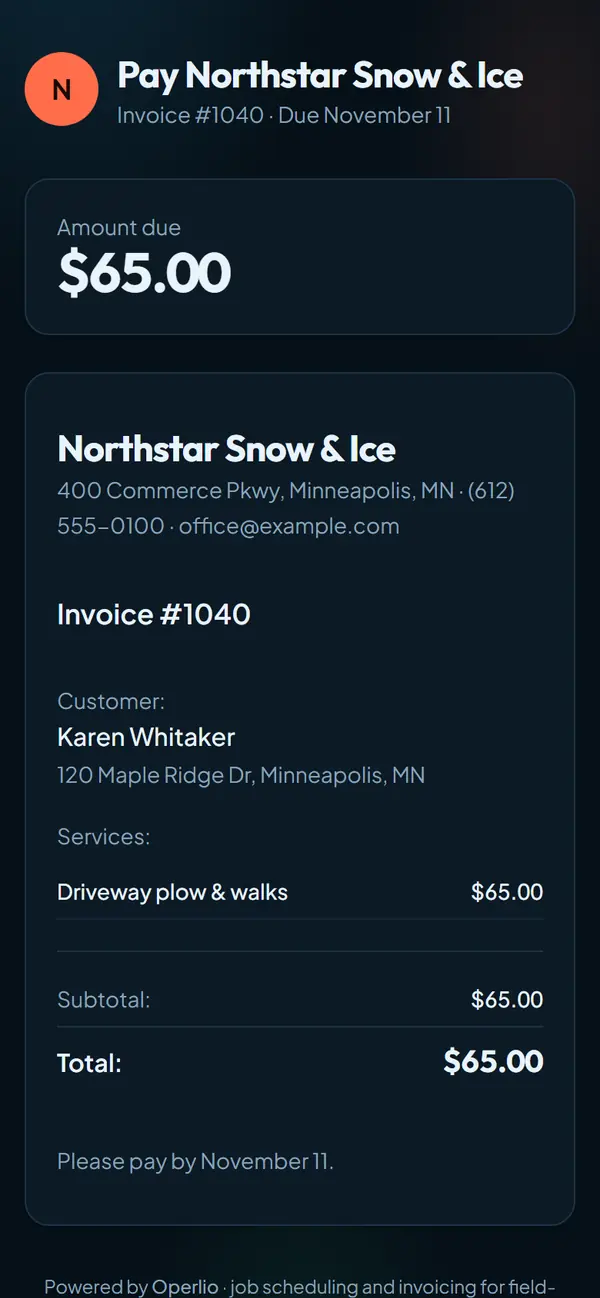
Customers get reminded and pay online
They get a text and email reminder the day before, then the invoice with a pay-by-card link. Or they save a card once and pay automatically. No app to download.


Finish the job. Get paid.
Card payments go through your own Stripe account and settle to your bank, never ours. Stripe's standard card fees apply, and Operlio adds nothing on top. Cash, check and bank transfers are recorded on the invoice in a tap.
Autopay
A customer saves a card once on a secure Stripe page. Every new invoice is charged to it automatically, so weekly customers pay without you asking.
Pay links
Every invoice goes out by text or email with a pay-by-card link. Customers pay from their phone, with no app and no account.
Reminders
Customers get a reminder the day before each visit. When an invoice goes past due, an automatic reminder with a pay link goes out, by default 3 days later, then weekly, up to 3 times. It stops when they pay.
What Operlio costs for a snow removal business
Plans differ only by how many people you add. Every feature is on every plan, card payments go straight to your own Stripe account, and the 14-day free trial needs no card. Month to month, cancel anytime.
Starter
$19 CAD$13.99 USD£9.99$20.99 AUD$22.99 NZD/mo
Up to 3 users
Crew
$79 CAD$55.99 USD£41.99$86.99 AUD$95.99 NZD/mo
Up to 10 users
Business
$149 CAD$104.99 USD£78.99$163.99 AUD$179.99 NZD/mo
Up to 30 users
Same crew of 5. About a third of the bill.
Paying for Jobber or Housecall Pro? This is what a crew of five pays each month, from each company's own pricing page. The difference stays in your business. On Operlio the price includes every feature and your texts to customers.
- Operlio Crew (up to 10 users)$79 CAD/mo
Billed monthly. Every feature and customer texts included.
- Jobber Connect (5 users)approx. $209 to $279 CAD/mo
- Housecall Pro Essentials (5 users)approx. $209 to $265 CAD/mo
- LawnPro Grow (up to 7 employees)approx. $139 to $181 CAD/mo
Other products' prices as listed on their websites, October 2026. They list US dollars only, so we converted them at about 1.40 Canadian dollars per US dollar. Converted prices are approximate. Operlio's price is in Canadian dollars. Ranges run from annual to monthly billing. Prices change, so check their sites for current pricing.
- Operlio Crew (up to 10 users)$55.99 USD/mo
Billed monthly. Every feature and customer texts included.
- Jobber Connect (5 users)$149 to $199 USD/mo
- Housecall Pro Essentials (5 users)$149 to $189 USD/mo
- LawnPro Grow (up to 7 employees)$99 to $129 USD/mo
Other products' prices as listed on their websites, October 2026, in US dollars per month. Ranges run from annual to monthly billing. Prices change, so check their sites for current pricing.
Prices in CADPrices in USDPrices in USDPrices in USDPrices in USDThis changes the prices you see. Your plan is billed in the currency of the country your business is in.
No fine print. Here's what you're signing up for.
Operlio is new, so instead of a wall of reviews, here are the facts you can check.
Every feature on every plan
Plans differ only by how many people you add. No setup fee, no sales call. Customer texts, autopay, photo proof and reports are never an upsell.
No card to try it, no contract after
Your 14 free days start the first time you start a job or add a customer. After that it's month to month. Cancel in Settings anytime and keep access until the end of what you paid for.
Your data leaves with you
Download your customers, jobs and invoices in one file from Settings whenever you want, on every plan. Invoices also export as a spreadsheet (CSV) for your bookkeeper.
Payments run through Stripe
Card payments go through your own Stripe account and settle to your bank. Operlio never holds your money and adds no fee. Stripe's standard card fees apply.
English, Spanish and French
The app, and the invoices, quotes, reminders and pay pages your customers get, in English, Spanish or French, set per customer.
A real person answers
Questions before or after you sign up go to a real inbox, and a person writes back. No bots.
Email us: support@hello.operlio.ioHow your data is protected
Questions owners ask us
The short answers: price, the trial, texts, card fees, switching and your data.
How does on-call scheduling work?
Set a client's service to on call. When a storm comes, open the dispatch list, tick the clients to clear, and Operlio creates the visits with the stops ordered nearest-first. Nothing is scheduled between storms.
Can I see which driveways are done?
Yes. Every stop on the map is color-coded: not started, in progress, completed. A completed stop carries the crew's photo and the time it was done.
Can I bill a seasonal contract instead of each push?
Yes. Set a client's on-call service to a seasonal contract: the season price, the number of monthly payments and the first payment date. Operlio sends each payment's invoice on its date, or charges the client's saved card when autopay is on. Visits are included, or capped at a number of visits with a price for each extra one.
Can I split a storm between two trucks?
Yes. Pick two or more crew members when you dispatch. Operlio splits the stops into one area per truck, balanced by how long each route should take, and shows the split before it creates anything.
What size of snow plow business is Operlio for?
It works for one truck or a whole fleet: on-call dispatch, a route in nearest-first order, photo proof at every stop and invoicing are on every plan, starting with the Starter plan for up to 3 people.
Can I run lawn care in summer and snow removal in winter?
Yes. Pause a customer's summer service at the end of the season and put them on call for snow. The same customer list works all year.
How much does Operlio cost?
Starter is for up to 3 people (an owner plus two helpers), Crew covers up to 10 people, and Business up to 30. The pricing page shows each price in your currency. Billing yearly takes 20% off. Plans differ only by how many people you add, and every feature is on every plan, so nothing is held back for a higher tier. Texts to your customers are included, and there is no setup fee.
Is there a contract? Can I cancel anytime?
No contract. Monthly plans run month to month: cancel from Settings anytime and you keep access until the end of the period you've paid for. Yearly plans are paid up front for the year; you can turn off the renewal anytime. The 14-day free trial needs no card and starts the first time you start a job or add a customer (or when you start it from Settings).
Do texts to my customers cost extra?
No. Texts to your customers (reminders, quotes, invoices and their replies) are part of your plan. Operlio doesn't charge per text. You choose which messages go out in Settings → Communications, and customers can reply STOP anytime.
Do my customers need an app?
No. Customers get their quotes, reminders and invoices by text and email, as links they open on their phone. They can accept a quote, pay by card or save a card for autopay right from that link, with nothing to download and no account to create.
My crew isn't good with apps. Will they use it?
The crew's phone view is one list of today's stops. They open a job, tap Start, take the photos you ask for and tap Complete. You invite each person by email, and your customers have nothing to learn or install. Try it on one route during the 14 free days before you decide.
How do I switch from Jobber, Housecall Pro or paper?
Settings → Advanced → Your data has a customer import. Export your customer list from Jobber, Housecall Pro, QuickBooks, Square or a spreadsheet (as a CSV file) and bring it in instead of retyping it. The import never messages your customers. It brings over customers, not past jobs or invoices, so keep your old export for the history. Working from paper? Add customers as you go; each one takes about a minute.
Where does the card money go, and what are the fees?
Straight to you. Operlio never holds your money. Card payments run through your own Stripe account and settle to your bank, not ours. Stripe charges its standard card fee on each payment, and Operlio adds no fee on top. You're the merchant of record, so disputes and refunds are yours to handle too. Cash, check and bank transfer go to you directly, and you record them on the invoice.
Is my data safe, and can I take it with me?
Yes. You can export all your data from Settings in one file at any time, on every plan, with no support ticket to file and no downgrade that removes the export button. Invoices also export as a spreadsheet (CSV) for your bookkeeper. Card payments run through Stripe, and Operlio never holds your money. The Security page explains how your data is stored and protected.
Operlio runs these trades too
Free snow removal templates
Try it on next week's routes, free for 14 days.
Add your customers, set their visits and invite your crew by email. 14 days free, no card, month to month after that.
Start free trial